

The short answer
Australian households and small businesses most commonly use ChatGPT for drafting and research, Google Gemini for calendar scheduling, Claude for long-form writing and document analysis, Microsoft Copilot for Microsoft 365 integration, Canva for design, and Xero with AI features for accounting. Free tiers cover most starting needs across all four major AI assistants. Paid plans range from AU$0 to approximately AU$150 per month per tool. The Privacy Act 1988 (Cth) applies to Australian businesses using AI tools that process personal information of Australians, specifically under Australian Privacy Principle 8 (APP 8) for cross-border transfers. This guide covers both households and small businesses across 10 task areas, with AUD pricing, free picks, and Privacy Act notes throughout.
What you'll take away
- Which AI tools Australian families and small businesses actually use, with AUD pricing
- Comparison tables for households and small businesses across every task area
- A myth-vs-fact block on the most common AI cost misconceptions
- What the Privacy Act 1988 (Cth) means for your data when you use AI tools
- Worked scenarios for a household and an SMB so you can see exactly how to start
- Two starter stacks (AU$0 and under AU$80 per month) you can act on today
AI tools for Australian households and small businesses in one paragraph: Australian households and small businesses most commonly use ChatGPT for drafting and research, Google Gemini for scheduling, Claude for document work, Microsoft Copilot for Microsoft 365 teams, Canva for design, and Xero for accounting. Free tiers exist for all four major AI assistants. Paid plans range from AU$0 to approximately AU$150 per month per tool. The Privacy Act 1988 (Cth) applies to Australian businesses processing personal information via overseas AI tools, particularly under APP 8. Best AI tools Australia 2026 picks in this guide cover both homes and businesses. Last updated November 2026.
Before you start:This guide reflects Bizkook's editorial assessment as at November 2026. Pricing may change. AUD figures are approximate conversions from USD unless an Australian pricing page exists. This is not financial or legal advice. Verify current pricing and data handling terms with each vendor before subscribing. Bizkook has no affiliate relationships with any tool listed.
DO:
- Start with one tool that solves your single biggest friction point
- Check for a free tier before subscribing (most leading tools have one)
- Review a tool's Data Processing Agreement before inputting personal or client data
DON'T:
- Subscribe to more than 2 to 3 tools at once; adoption collapses
- Assume US pricing equals AUD pricing; always verify on the Australian pricing page
- Choose based on popularity alone; test against your actual daily workflow
What Does “Useful” Actually Mean for an AI Tool in Australia?

Not every list of AI tools is built the same way. This guide evaluates artificial intelligence tools Australia against four criteria. First, real-world applicability: tools are only included if they have been tested in actual workflows, not just reviewed from a conference demo. Second, AUD-accessible pricing: if a tool is prohibitively expensive once converted to Australian dollars, it does not belong in a guide for Australian households and small businesses. Third, genuine category differentiation: this guide does not list three tools that do the same thing. Fourth, data handling transparency: tools that do not clearly address Privacy Act 1988 (Cth) obligations are flagged or excluded.
This is not an affiliate list. No vendor paid to appear in this guide. It is not a US guide with an “Australia” tag appended. It is a guide written specifically for Australian households and small businesses, with AUD pricing, local regulatory context, and dual-audience framing throughout. If a tool only makes sense in a business context, it appears only in the SMB sections. If it only makes sense at home, it appears in the household sections. Tools that work in both sit in the dual-audience sections with “At home” and “In the business” framing.
The Office of the Australian Information Commissioner (OAIC) at oaic.gov.au has published guidance on AI and data handling that informed the privacy sections of this guide. The guide is reviewed quarterly. This version is November 2026. AI tools Australia and AI tools for Australians categories are both covered.
Useful AI tools Australia, in Bizkook's assessment, are those that fit into real Australian workflows, cost a reasonable amount in AUD, and do not expose your data to unnecessary risk. Bizkook evaluates AI tools for Australian households and businesses against four criteria: real-world applicability, AUD-accessible pricing, category differentiation, and Privacy Act 1988 (Cth) data handling transparency.
The AI Tools Already in Your Life (And You May Not Have Noticed)

What is an AI tool? An AI tool is any software that uses machine learning or a large language model to do something useful: writing, planning, answering questions, recognising patterns, or generating content. AI tools for everyday life Australia are already on most Australian phones and computers. The term covers everything from Siri asking you to set a reminder to ChatGPT writing a draft email from scratch. What matters is whether the tool is doing something useful for you, not how the technology behind it is classified.
The generative AI Australia households conversation often starts with the assumption that AI tools are new, expensive, and complicated. Most Australians are already using AI tools without thinking about it. Siri and Google Assistant handle voice queries. Gmail's Smart Reply suggests responses to your emails. Google Maps routes you around traffic in real time using AI prediction. Spotify and Netflix recommendation engines decide what you see next. Your smartphone camera recognises scenes and adjusts settings automatically. These are all AI tools for everyday life.
At home:Gmail Smart Reply handles quick responses to school newsletters and family coordination emails. Spotify's Discover Weekly generates a personalised playlist every Monday. These are AI tools most Australian households already use daily without categorising them as AI.
In the business: Gmail Smart Reply also surfaces in professional inboxes. Google Maps live routing is used by delivery businesses and mobile tradespeople. These tools appear in both contexts without any setup.
An editorial estimate based on Australian digital adoption data suggests around 58 per cent of Australians used at least one AI tool in 2026. Best AI tools Australia 2026 picks in this guide are the deliberate-use category: tools Australians choose specifically because they want to solve a problem. The rest of this guide covers the AI tools Australians are deliberately choosing, not the ones bundled into existing apps.
AI tools for everyday life and AI tools for Australians in this guide include ChatGPT, Claude, Google Gemini, Canva, and others. These are generative AI tools: you decide to open them, give them a task, and get a result. For our full ranked list of AI tools for 2026, see our full ranked list of AI tools for 2026.
How to Get Started Without Wasting Time or Money

How to use AI at home Australia step by step is one of the most common questions households ask. The answer is the same whether you are asking which AI tool is best for a new Australian small business or trying to work out where to begin at home. The process has five steps.
- Identify your single biggest friction point. Write down the task that costs you the most time or causes the most frustration this week. At home: meal planning, managing school schedules, drafting emails. In the business: writing proposals, following up on leads, reconciling accounts. That friction point is your starting category.
- Pick the tool category, not the tool. Decide: writing help, planning and scheduling, design, accounting and admin, or customer service. Only after you know the category should you look at specific tools.
- Start free. Every major AI tool has a free tier or a 14-day trial. Use it for 2 weeks before committing to any paid plan. If you cannot see clear value in the free tier, the paid tier will not fix it.
- Test it on a real task today. Do not watch a demo. Open the tool and do the task you would normally do manually. This is the only way to know if it fits your actual workflow.
- Measure before adding the next tool. After 4 weeks of genuine daily use, write down how much time you saved. Only add a second tool after the first is producing real return.
Scenario: Priya, sole-occupant renter, Melbourne
Priya wants to try AI tools for Australian households but does not know where to start. Her biggest friction: meal planning and grocery shopping takes 90 minutes every Sunday. Step 1: friction is meal planning. Step 2: category is planning and scheduling. Step 3: starts with ChatGPT free tier. Step 4: inputs her dietary preferences and weekly budget; gets a 5-day meal plan in 3 minutes. Step 5: after 4 weeks, Sunday meal planning takes 10 minutes instead of 90.
Scenario: Ahmed, 4-person tradie business, Sydney
Ahmed's biggest friction: writing quotes and follow-up emails takes 2 hours a week. Step 1: friction is writing. Step 2: category is writing tools. Step 3: starts with Claude free tier. Step 4: drafts a quote template, tests it on a real job. Step 5: after 4 weeks, quote-writing takes 20 minutes instead of 2 hours. For more on how to put AI to work in your small business, see how to put AI to work in your small business.
ChatGPT (OpenAI), Claude (Anthropic), Google Gemini, and Microsoft Copilot all offer free tiers that cover the first step. The useful AI tools Australia question is not which tool is objectively best. It is which tool fits the task you are starting with. AI tools for Australian households and small businesses that are worth trying all have free tiers. Start there.
Not sure where your business or household sits on AI readiness? The AI Tune Score maps it.
A free 5-minute assessment that tells you which AI category to start with, based on your actual workflow. No email required to start.
Free vs Paid: What AI Tools Actually Cost Australians in 2026

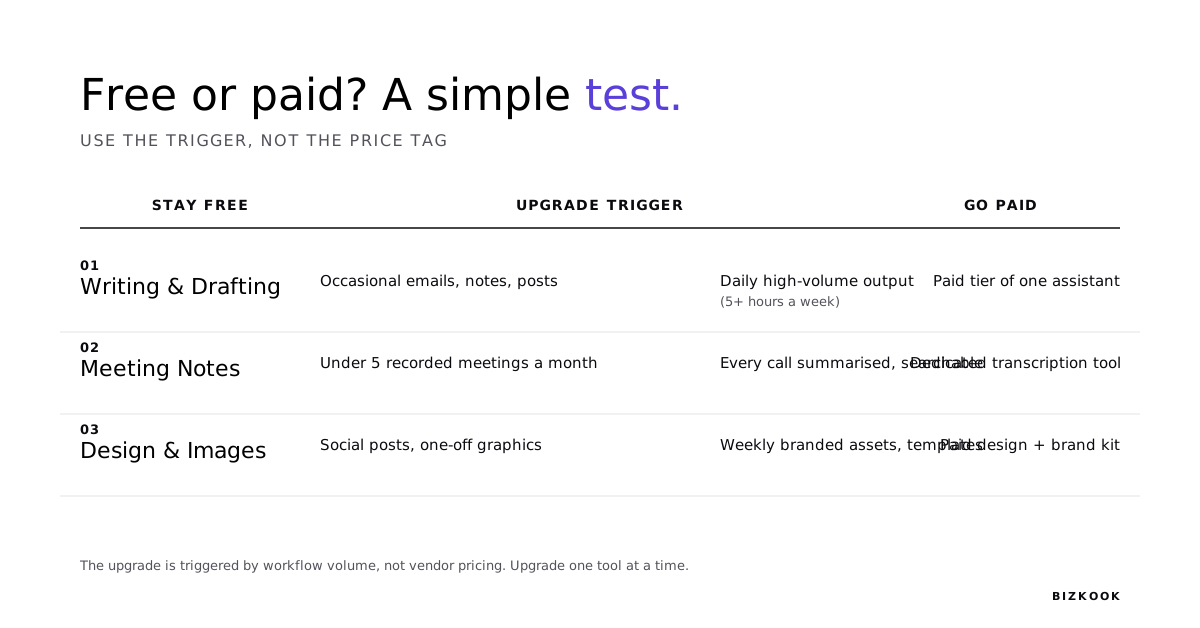
Most Australians can start with AI tools for free. All four of the major AI assistants, ChatGPT, Claude, Google Gemini, and Microsoft Copilot, have usable free tiers. AI tools cost AUD Australia figures shift with exchange rates, so the numbers below are AUD estimates at November 2026. AI tool subscription cost Australia for a household using AI for meal planning, homework help, and budgeting on the free tiers of ChatGPT, Canva, and Gemini is AU$0 per month. Best free AI tools for Australian households and free AI tools Australia options exist across every major category.
| Tool | Free Tier | Monthly Cost AUD (approx.) | Upgrade When... |
|---|---|---|---|
| ChatGPT (OpenAI) | Yes, GPT-4o limited | Free / approx. $30 Plus / approx. $45 Team | When you hit the daily message cap or need image generation daily |
| Claude (Anthropic) | Yes, Claude 3.5 Sonnet limited | Free / approx. $30 Pro / approx. $45 Team | When you need longer context windows or daily heavy drafting |
| Google Gemini | Yes, Gemini 1.5 Flash | Free / approx. $30 Advanced | When you need deep Google Workspace integration |
| Microsoft Copilot | Yes, via Edge and Windows | Free / approx. $38 M365 Personal | When your household or team is already on Microsoft 365 |
| Canva | Yes, solid free design features | Free / approx. $20 Pro / approx. $15 per user Teams | When you need brand kits, full AI features, or background removal at volume |
| Grammarly | Yes, basic grammar | Free / approx. $20 Premium | When you are editing daily at professional quality |
| Otter.ai | Yes, 300 mins per month | Free / approx. $25 Pro | When you are running more than 10 client calls per month |
| Notion AI | Via Notion free plan | Add-on approx. $15 per user | When your team already uses Notion and needs AI in-workspace |
AI tools Australian small business free options are listed in the table above. Canva free Australia is a genuinely strong free tier. AI tools for Australians on a budget and AI on a budget Australia both point to the same answer: start with the free tiers of the top four assistants and Canva. That covers the majority of household and SMB starting tasks at zero cost.
A practical SMB starter stack of three tools (Claude Pro at approx. AU$30 plus Canva Pro at approx. AU$20 plus Otter.ai Pro at approx. AU$25) costs approximately AU$75 per month. All pricing is AUD estimates. Verify on vendor Australian pricing pages before subscribing.
Myth vs Fact: AI tool costs in Australia
| Myth | Fact |
|---|---|
| AI tools are expensive for small businesses. | Most leading AI tools offer free tiers that cover a genuinely useful subset of features. A practical SMB starter stack of three tools costs under AU$80 per month. The question is not whether you can afford them; it is whether you will actually use them. |
| Free AI tools are low quality. | The free tiers of Claude, ChatGPT, and Canva all use the same underlying models as the paid tiers, with usage limits rather than quality limits. For light use, the free tiers are production-grade. |
| You need to subscribe to multiple tools to see results. | Most households and businesses see meaningful return from one well-chosen tool. Tool sprawl is a bigger risk than having too few subscriptions. |
For a dedicated guide to free options, see best free AI tools for Australian households and businesses.
ChatGPT, Gemini, Claude, or Copilot? A Plain-English Comparison

There is no single best AI assistant for Australians. ChatGPT vs Claude Australia and ChatGPT vs Google Gemini for Australian households are both questions whose answer depends on what tools you already use and what tasks you are asking the AI to handle.
| Tool | At home, best for | In the business, best for | Free tier | AUD paid plan (approx.) | Key limitation |
|---|---|---|---|---|---|
| ChatGPT (OpenAI) | Homework help, meal planning, general Q&A, voice assistant on mobile | Drafting, research, image generation (GPT-4o), plugin ecosystem | Yes | approx. $30 Plus | Daily cap on free; US-based data storage |
| Claude AI (Anthropic) | Long document reading, creative writing, nuanced advice | Long-form drafting, proposal writing, document analysis | Yes | approx. $30 Pro | No real-time web search on base tiers |
| Google Gemini | Calendar and Gmail integration, voice queries, Android native | Google Workspace (Docs, Sheets, Gmail) AI layer | Yes | approx. $30 Advanced | Best value only if already in Google ecosystem; Google Gemini Australia review confirms this |
| Microsoft Copilot | Windows integration, Edge browser, Microsoft 365 on personal devices | Microsoft 365 (Word, Excel, Teams, Outlook) AI layer; Microsoft Copilot Australia | Yes | approx. $38 M365 Personal | Best value only if team is on Microsoft 365 |
For most Australian households, ChatGPT's free tier covers 80 per cent of use cases. Google Gemini is the natural pick for Android users already in Google Calendar and Gmail. Claude is the pick for anyone who reads or writes long documents regularly.
For SMBs, the main distinction is ecosystem fit. If the team runs on Microsoft 365, Copilot is built in and costs nothing extra beyond the M365 subscription. If the team runs on Google Workspace, Gemini Advanced is the logical upgrade. Jasper AI Australia and Copy.ai Australia are specialist writing tools for content teams producing marketing copy at volume, not general-purpose assistants for most households or SMBs.
For a detailed breakdown, see how ChatGPT, Claude, and Gemini compare for Australian users.
The Most Useful AI Tools for Australian Small Businesses (By Function)
AI for small business Australia 2026 covers six functional categories. AI tools for small business owners Australia work best when matched to real bottlenecks rather than industry trends. AI for small business Australia and AI for Australian business owners Sydney all point to the same starting question: what does your team spend the most time on manually?
Writing, Proposals, and Admin
Claude (Anthropic)is the strongest AI writing tool for long-form drafting, document analysis, and research synthesis. AI writing tools Australia recommendations consistently include Claude for proposal writing and report drafting because of its 200K-token context window. ChatGPT is the stronger pick for shorter copy and broader plugin integration. Grammarly Australia review: Grammarly's free tier handles basic editing; the Premium tier at approx. AU$20 per month adds tone and clarity suggestions useful for client-facing writing. At home: the same tools work for drafting school emails, letters, and personal documents.
Claude AI, ChatGPT, and Grammarly cover the writing and admin category. AUD cost: free to approx. AU$30 per month per tool.
Design and Marketing Content
Canva AI is the primary recommendation for design and marketing content for Australian SMBs. Canva AI for small business features include Magic Design (generate a full design from a prompt), brand kits, and AI image generation. AI tools for Australian small business marketing and AI for content creation Australia SMB both point to Canva as the starting tool for non-designers. Canva is Australian-founded. AUD pricing is available directly at au.canva.com: free to approx. AU$20 Pro per month. At home: Canva free Australia tier handles invitations, birthday cards, and family newsletters at no cost.
Accounting, Finance, and EOFY
Xero with AI features is the primary recommendation for Australian SMB accounting. Xero AI features Australia include auto-categorisation of transactions, anomaly flagging, and financial summary generation. AI tools for EOFY Australia small business preparation is where Xero AI features deliver the most visible return: automated reconciliation and EOFY reporting replace hours of manual work. AI tools for Australian accountants who work with SMB clients also typically use Xero. MYOB offers AI-assisted reconciliation from approx. AU$27 per month. The AI features are built into existing subscriptions, not a separate cost. Xero starts from approx. AU$35 per month (Starter plan). At home: Pocketbook (free, Australian) serves the household budgeting equivalent.
Meetings, Transcription, and Follow-Up
Otter.ai Australia is the strongest option when you need live, in-meeting transcription. AI productivity tools Australia and AI productivity apps Australia both include Otter.ai as a standard pick. The free tier covers 300 minutes per month. Fathom (free, unlimited meetings) is the standout free option for most SMBs. Fireflies.ai is the stronger choice when meeting records need to sync automatically to a CRM. Privacy note: recordings contain potentially sensitive business data. Verify data storage region against APP 8 of the Privacy Act 1988 (Cth) before using any meeting tool for client calls. Notion AI Australia can also capture meeting notes if the team already works inside Notion.
Automation and Workflows
Make.com automation Australia SMBis the preferred recommendation for cost-effective multi-step workflows. Automation tools Australia small business options include Make.com (free to approx. AU$28 per month Core plan), Zapier (non-technical users, widest app library), and n8n (technical teams who want self-hosted control). AI tools for Australian tradies and AI tools for sole traders Australia both benefit from Make.com's free tier, which can automate simple business processes such as invoice-sent notifications or lead-form-to-email sequences. Privacy note: automation workflows that move personal data between systems may engage APP 3 (collection) and APP 8 (cross-border transfer) obligations under the Privacy Act 1988 (Cth). At home: Make.com's free tier can automate household tasks such as adding a new Google Calendar event to a shared shopping list.
For real examples, see real automation examples from Australian small businesses. For tradies specifically, see AI tools specifically for Australian tradies.
Customer Service and Communication
Tidio Australia small business is the recommended AI live chat tool for SMBs handling inbound enquiries. AI customer service tools Australia in this category include Tidio (free to approx. AU$35 per month), HubSpot AI (free CRM with paid AI features from approx. AU$22 per month), and Intercom (larger SMBs). AI tools for work from home Australia and AI tools for work from home Australian users also apply here: chat tools handle inbound while remote teams focus on delivery. Generative AI tools Australia business adoption of chat tools is growing particularly in professional services and retail. At home: not directly applicable for most households.
| Function | Recommended Tool | AUD Cost (approx.) | Free Tier | At home equivalent |
|---|---|---|---|---|
| Writing and admin | Claude or ChatGPT | Free to $30 per month | Yes | Same tools |
| Design | Canva AI | Free to $20 per month | Yes | Canva free |
| Accounting | Xero with AI features | From $35 per month | No | Pocketbook (free) |
| Meetings | Fathom | Free | Yes | Same tool |
| Automation | Make.com | Free to $28 per month | Yes | Make.com free |
| Customer service | Tidio | Free to $35 per month | Yes | N/A |
AI for small Australian business productivity is highest when each category is adopted one at a time. AI tools for Australian small business marketing and generative AI tools Australia business picks both appear in the design and writing rows above. For a broader view, see how to put AI to work in your small business.
Already know you need AI tools but not sure which ones fit your business?
Bizkook helps Australian small businesses choose and deploy the right AI stack. No obligation. No pitch. 15 minutes.
The Most Useful AI Tools for Australian Households (By Task)
AI tools Australian households use most often fall into six task categories. AI apps for Australian families and best AI tools for home use both point to tools that are free or close to it, require no technical setup, and fit into daily routines without extra effort.
Meals, Groceries, and Home Planning
ChatGPT (free tier)is the simplest AI tool for meal planning for Australian households because it requires no account setup beyond registering for the free tier, and it understands plain-English prompts. AI meal planning Australia using ChatGPT: open the free tier and type “I have [these ingredients], a budget of AU$150 per week, and [dietary restriction]. Give me 5 dinners with a shopping list.” An AI recipe planner Australia result appears in under 30 seconds. ChatGPT for home use Australia is one of the most common household AI use cases in 2026. Google Gemini (free) also handles meal planning well for Android users. Mealime is an AU-available app for dedicated meal planning with a free tier. In the business: the same tools work for catering planning for events or staff meals.
Household Budgeting and Finance
Pocketbook (Australian, free) and ChatGPTtogether cover AI for home budgeting Australia for most households. AI tools for Australian renters budgeting benefit from Pocketbook's categorisation of spending by merchant, plus ChatGPT for scenario planning (for example: “If I cut my grocery budget by $50 per week, what does my savings position look like in 6 months?”). AI tools that save money for Australian families work by making spending visible and by modelling budget scenarios faster than a spreadsheet. Privacy note: avoid inputting full bank account credentials or Tax File Numbers into any general AI tool. In the business: Xero AI features handle the SMB equivalent.
Helping Kids Study and Learn
ChatGPT and Khan Academy Khanmigo(free for students) are the primary picks for AI for homework help kids Australia. Best AI apps for homework help Australia include these two plus Duolingo Max for language learning support. AI tools back to school Australia 2026 use peaks in January and February (new school year) and October to November (HSC and VCE study periods). AI tools for education Australia cover concept explanation, practice question generation, and step-by-step problem-solving at the student's level. AI assistant for Australian families doing homework: ChatGPT is the most accessible starting point for primary and secondary students. ChatGPT Australia households with school-age children is one of the highest-adoption household use cases. In the business: the same AI explanation tools work for staff training and onboarding.
Health, Wellbeing, and Aged Care at Home
Wayly AI aged care Australia is an Australian-available companion tool for older family members. AI tools for aged care at home Australia in 2026 include Wayly AI (companionship and cognitive engagement), Calm AI (mental wellbeing), and Nomi AI (older adult companion tools). AI health apps Australia household users should note: these tools supplement, they do not replace, registered health professionals. Any health-related AI tool should be discussed with a treating GP or allied health professional before use. AI for home organising Australia and AI scheduling apps Australia tools are separate from health tools: see the section below for those. In the business: health and wellbeing apps are used in workplace wellness programs by some SMBs.
Home Organisation and Scheduling
Google Gemini(free, integrates with Google Calendar) is the simplest AI tool for home organising Australia because it reads and writes your existing calendar without any setup. AI for Australian families 2026 with school-age children benefit most from Gemini's calendar integration: it can schedule family appointments, set reminders, and coordinate household logistics across Android devices. AI scheduling apps Australia options include Gemini (Google users), Microsoft Copilot (Microsoft 365 users), and Todoist AI (AU available, free tier). AI tools household chores Australia: Google Gemini can read your recurring chore schedule and prompt reminders. AI for Australian families 2026 managing complex schedules find the Google Workspace integration the lowest-friction entry. In the business: scheduling AI is covered in the SMB automation section.
Home Energy and Utilities
Amber Electric AIis the most distinctively Australian AI energy tool available. AI energy apps Australia home users can access Amber's algorithm, which uses live Australian spot prices to shift appliance usage to cheaper periods. This is unique to the Australian energy market. Origin Energy AI features and Google Nest AI also apply to Australian households managing smart home devices. AI tools for Australians on a budget can use Amber Electric's base tier (AU$0 plus usage) to reduce electricity bills through demand shifting. In the business: energy management AI applies to high-consumption SMBs in manufacturing and hospitality.
| Task | Recommended Tool | AUD Cost | Free Tier | In the business equivalent |
|---|---|---|---|---|
| Meal planning | ChatGPT | Free to $30 per month | Yes | Catering planning |
| Budgeting | Pocketbook plus ChatGPT | Free | Yes | Xero AI |
| Homework help | ChatGPT plus Khanmigo | Free | Yes | Staff training AI |
| Aged care companion | Wayly AI | Contact vendor | Limited | Workplace wellbeing apps |
| Scheduling | Google Gemini | Free to $30 per month | Yes | Make.com automation |
| Energy management | Amber Electric AI | AU$0 base plus usage | Yes | Building energy management |
AI for Australian families 2026 and ChatGPT Australia households are the two most searched household AI categories. For a full guide to free household options, see best free AI tools for Australian households. For ChatGPT plans, AUD pricing, and data details, see ChatGPT plans, AUD pricing, and what happens to your data.
What a Practical Starter Stack Looks Like (Free to AU$30 per Month)
AI tools for Australians on a budget and AI on a budget Australia both point to the same starting answer: pick one stack matched to your situation and use it for a month before adding anything else. AI tools for Australian households and small businesses that deliver real return all share one pattern: they solve a specific friction point, not a general aspiration.
Household Starter Stack (AU$0 per month):
- ChatGPT free tier: meal planning, homework help, general drafting
- Google Gemini free: calendar scheduling
- Canva free: design and invitations
- Pocketbook free: budgeting
Total cost: AU$0 per month. Time to set up: under 30 minutes.
SMB Starter Stack (under AU$30 per month):
- Claude Pro approx. AU$30 per month: proposals, emails, research
- Canva free tier: design
- Fathom free: meeting transcription
Total cost: approx. AU$30 per month. Time to set up: under 1 hour.
SMB Mid-Tier Stack (under AU$80 per month):
- Claude Pro: approx. AU$30
- Canva Pro: approx. AU$20
- Otter.ai Pro: approx. AU$25
Total: approximately AU$75 per month. Covers writing, design, and meeting transcription for a team of 1 to 5. AI tools cost AUD Australia at this level delivers a comprehensive starting point.
These stacks are starting points, not prescriptions. The right stack for your household or business depends on your friction point. Adding more tools does not add more value. Start with one stack. Best AI tools Australia 2026 picks for the stacks above are all verified for Australian availability. Useful AI tools Australia that fit into these stacks are all available on Australian pricing pages. For our full ranked list of 25 AI tools for 2026, see our full ranked list of 25 AI tools for 2026.
If you've read this far and still have questions, that's what Bizkook's AI consulting is for.
We work with Australian households and small businesses from Sydney to Perth. First conversation is free.
Your Data and Australian Privacy Law: What You Need to Know
Where does my data go when using AI in Australia? When you type a question into ChatGPT, Claude, or any AI tool, that input is typically processed and stored on servers outside Australia, usually in the United States. Under the Privacy Act 1988 (Cth), specifically Australian Privacy Principle 8 (APP 8), businesses that disclose personal information to overseas recipients must take reasonable steps to ensure the recipient's handling of that information is consistent with the APPs. For individuals at home, APP 8 does not directly apply, but your data may still be used by the vendor to train future models unless you actively opt out. AI tools Privacy Act 1988 Australia cross-border data obligations and Privacy Act AI tools Australia guidance is available from the OAIC at oaic.gov.au.
Is ChatGPT safe to use in Australia? For general household tasks such as meal planning, drafting, and homework help, yes, with ordinary care. The boundaries are clear: do not input your Tax File Number, Medicare number, full banking credentials, or the personal details of your clients into any public AI tool.
At home: what you need to know
- Your inputs may be used to train AI models on most free tiers. Check the vendor's privacy settings and opt out if available.
- ChatGPT: users can opt out of training data use in Settings, then Data Controls.
- Google Gemini: activity can be paused in My Activity settings.
- Claude: Anthropic's Team tier explicitly excludes your inputs from model training.
- Use incognito mode if testing tools with personal queries you do not want linked to your account.
In the business: what you need to know
- Any business processing personal information of Australians is subject to the Privacy Act 1988 (Cth) if annual turnover exceeds AU$3 million, with exceptions for health service providers and others.
- APP 8: before disclosing personal information to an overseas AI tool, businesses must take reasonable steps to ensure the tool handles it consistently with the APPs. This may engage APP 8 obligations, and your business should seek legal advice specific to its situation.
- Practical step: request and read the vendor's Data Processing Agreement (DPA) before inputting client names, contact details, financial data, or health information into any AI tool.
- APP 11: businesses must take reasonable steps to protect personal information from misuse, loss, or unauthorised access under the Privacy Act 1988 (Cth), Schedule 1, Part 2.
- OAIC guidance: the Office of the Australian Information Commissioner has published a guide to privacy and AI at oaic.gov.au/privacy/privacy-guidance-for-organisations-and-government-agencies/artificial-intelligence/
What tools offer better privacy for Australian users:
- Microsoft Copilot (M365 Business):data stored in accordance with Microsoft's EU Data Boundary, offering better data residency options than consumer tools.
- Claude Team tier:explicit opt-out of training data use. Anthropic's privacy policy is clearer than most consumer AI tools on this point.
- n8n (self-hosted): keeps automation workflows on your own servers, removing cross-border transfer of business data entirely.
AI data privacy Australia 2026 guidance continues to evolve. The voluntary Australian AI Safety Standard (Department of Industry, Science and Resources, DISR, 2024) provides relevant guidance on responsible AI use. For current OAIC guidance, see oaic.gov.au. For ChatGPT plans, AUD pricing, and data details, see ChatGPT plans, AUD pricing, and what happens to your data. AI tools for Australian households and small businesses that handle personal information all carry Privacy Act 1988 (Cth) implications for business users.
When You Need More Than a Tool: Bizkook's Free AI Assessment
Bizkook AI tools guide Australia resources are built for Australian households and businesses that want to move beyond the generic advice and get a personalised starting point. The Bizkook best AI tools picks in this guide are all editorial. No vendor paid to be here. AI tools Bizkook recommends are chosen against the four criteria in the opening section of this guide: real-world applicability, AUD-accessible pricing, category differentiation, and Privacy Act 1988 data handling transparency.
AI tools Sydney practitioners and businesses can access two starting points without any cost or commitment. The free AI Tune Score at bizkook.com/ai-tune-score is a 5-minute assessment that maps where a business or household sits on AI readiness and identifies which category to start with based on actual workflow patterns, not industry trends. A discovery call at bizkook.com/book is a 15-minute conversation with a Bizkook consultant. No obligation. No hard sell. For businesses that have tried tools and hit a wall, that conversation maps where the blockage is.
AI consulting Sydney households and small businesses across the country can access Bizkook's services. Bizkook works with Australian small businesses and households across Sydney, Melbourne, Brisbane, and Perth. AI for Australian business owners Sydney is the primary service area, but clients across all capital cities and regional areas are served remotely.
Every tool in this guide is an editorial pick. Bizkook has no affiliate or commercial relationship with any vendor mentioned. Bizkook AI tools guide Australia content is reviewed quarterly. Next review: February 2027.
Ready to find out which AI tools are right for your household or business? Start here.
Free AI Tune Score: 5 minutes, no email required. Discovery call: 15 minutes, no obligation. AI consulting: for households and businesses that need implementation help.
How to choose your first AI tool: a short guide for Australian households and small businesses. Covers category-first selection, AUD budget framing, and the Privacy Act 1988 data question in plain English. [Video: coming soon]
Browse more Bizkook guidesPricing is Bizkook's editorial assessment as at November 2026 and may change. AUD figures are approximate conversions from USD vendor pricing unless an Australian pricing page exists. Verify current pricing and data handling terms with each vendor before subscribing. This is not financial or legal advice. For regulated industries (financial services, healthcare, legal), consult your compliance team before adopting any AI tool that processes client data. If you are unsure whether a tool complies with your obligations under the Privacy Act 1988 (Cth) or relevant sector regulation, consult a qualified privacy or legal professional.
Not sure which AI tools fit your situation?
Get a scored AI readiness snapshot in five minutes, or book a short call and we'll identify the two or three tools worth trying first.
Common questions
Answered directly, so they can be quoted without the surrounding argument.
There is no single best AI tool for every Australian small business. The right choice depends on your biggest bottleneck: if it is writing, start with Claude or ChatGPT; if it is accounting, start with Xero AI features; if it is meeting follow-up, start with Fathom (free). Take the free AI Tune Score at bizkook.com/ai-tune-score for a personalised starting point in 5 minutes. AI for small business Australia 2026 is best approached one category at a time.
How this piece was produced
Written by the Bizkook team based on direct experience advising Australian households and small businesses on AI tool selection and deployment across multiple industries. Tools were evaluated against the four criteria stated in the opening section of this guide: real-world applicability, AUD-accessible pricing, category differentiation, and Privacy Act 1988 (Cth) data handling transparency. Pricing is AUD estimates based on vendor pages and exchange rates at November 2026; verify before subscribing. Privacy compliance notes reference the Privacy Act 1988 (Cth), Australian Privacy Principles 3, 8, and 11, Office of the Australian Information Commissioner (OAIC) guidance at oaic.gov.au, and the voluntary Australian AI Safety Standard (Department of Industry, Science and Resources, DISR, 2024). Bizkook has no affiliate or commercial relationships with any tool mentioned. This guide is reviewed quarterly. Next review: February 2027. This is not financial or legal advice. Consult a qualified Australian professional for advice specific to your situation.
Disclaimer: This article is general business information only. It does not constitute legal, financial, tax, medical, or compliance advice. Pricing, tool features, regulatory requirements, and third-party AI capabilities change frequently. Verify current details directly with the relevant vendor, regulator, or qualified adviser before making a business decision. For Australian data-handling obligations refer to the Privacy Act 1988 (Cth) and the Australian Privacy Principles (APPs). For regulated industries (healthcare, legal, financial services, allied health, insurance, logistics) consult your professional body or a qualified adviser before implementing any approach described here.